
Sep 12, 2026 / By SW-SW / in Buying Guides Product Tips Tech & Gadgets
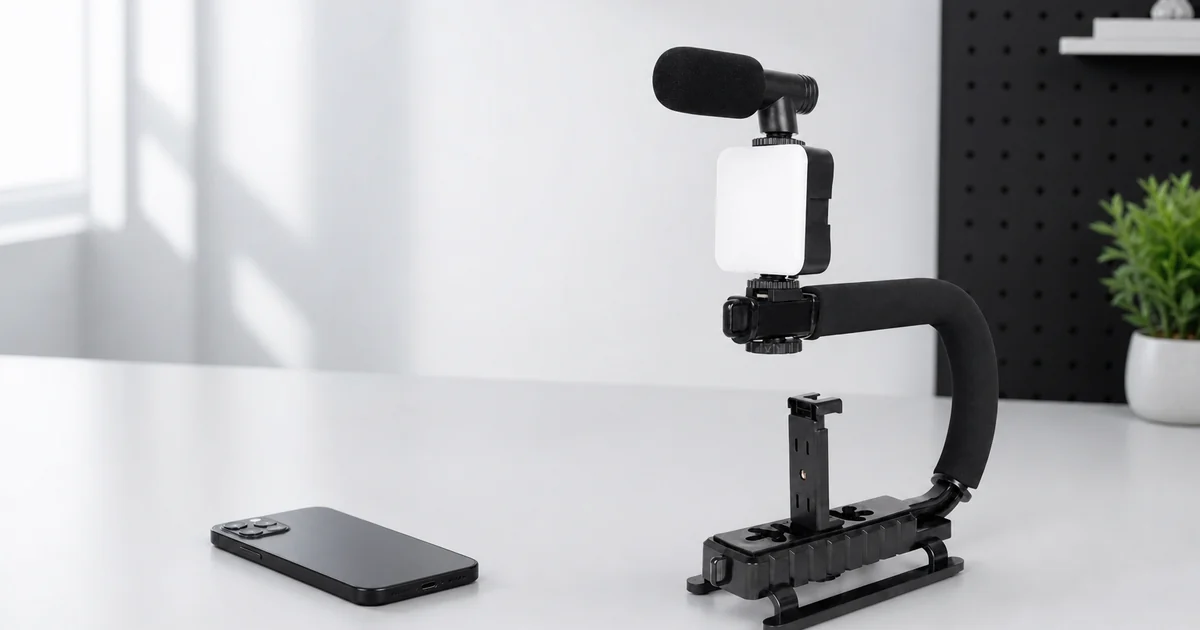
A smartphone vlogging rig with LED light is useful only when its handle, clamp and mounting layout match the way you record. This guide focuses on the U-shaped black rig shown with a foam-covered curved handle, central phone clamp, slotted base rail, white rectangular LED light and top foam-covered accessory. Use it to check phone fit, grip style, desk setup and realistic limits before choosing it.
This type of rig is best for shoppers who want a more deliberate way to hold a phone while filming short videos, tabletop clips, product shots or simple creator content. The handle and base give a physical frame around the phone clamp, while the LED light adds a visible lighting element.
This is a handheld frame, not a motorized gimbal or a guarantee of smooth footage. Results depend on your movement, the phone’s fit and the accessories confirmed for the selected package; do not assume universal phone compatibility.
Check that the central clamp holds the phone without pressing side buttons or covering the charging port, cameras or case edges. Include the case when comparing the phone’s width and thickness with the holder.
Compare your exact phone and case with the holder’s stated limits. A photo of another phone in the rig does not confirm your model will fit. If the relevant measurements are missing, ask for them before ordering.
The reference product has a black curved foam-covered handle attached to the frame. That handle gives the user a place to hold the setup instead of gripping the phone body. It can help with steadier handling, but it does not replace a powered stabilizer.
The handle also affects storage and bag fit. Buyers who want a flat pocket accessory may find the rig too bulky, while buyers who film at a desk or around products may appreciate the grip area.
The photos show a white rectangular LED light above the clamp. Check its stated brightness, power source and runtime before relying on it for a shoot; its appearance alone does not establish studio-level lighting or coverage of a large room.
A practical use case is recording small desk videos, close product clips or quick social content where an extra light source is useful. For larger rooms or outdoor night recording, shoppers should treat the light as a detail to verify, not a guaranteed solution.
Inspect the slotted base rail, screw areas and accessory positions before planning where cables or extra lights will go. Confirm the connection requirements of each accessory instead of assuming a visible mounting point will fit it.
The photos show a foam-covered accessory at the top. Do not assume it is an included microphone: check the package list and the selected option before ordering any audio equipment.
For a separately purchased voice-recording option, compare the wired 3.5 mm TRRS lavalier microphone and confirm that your device supports a compatible microphone input. A headphone-only output is not sufficient; a phone and any required adapter are not included with this microphone.
For plug wiring and adapter requirements, use the 3.5 mm TRRS microphone input and adapter guide before choosing an audio setup. The rig’s mounting points do not establish microphone compatibility.
A phone rig provides a physical grip and mounting frame. A motorized gimbal uses powered stabilization to compensate for movement. These are different functions; adding a handle does not turn this rig into a gimbal.
If your priority is motorized stabilization while moving, look for a product that explicitly provides it. Consider this rig when you need a handle, phone clamp and mounting frame, with lighting and accessories checked separately.
Make four checks: your phone fits the clamp, the grip suits how you hold it, the light meets your stated needs, and you do not require motorized stabilization. Resolve any missing measurements or lighting specifications before buying.
Then check the exact package contents and the connections needed for any accessories you plan to add. Do not treat every item shown in a setup photo as included in the option you select.
Use this table before planning your recording setup.
| Check | Good fit if | Pause if |
|---|---|---|
| Phone fit | Phone fits securely; buttons, ports and cameras stay clear | Clamp fit is unconfirmed or the case blocks placement |
| Stability | You need a handheld frame | You expect motorized stabilization |
| Lighting | Confirmed light specifications suit your recording distance | Required brightness or runtime information is missing |
| Accessories | Mounting points match your plan | You need unconfirmed add-ons |
| Storage | Bulkier frame is acceptable | You need pocket-flat gear |
Check the rig clamp and your phone with its case fitted before planning a shoot. These guides cover preparation and storage, not a guarantee that a particular case fits the rig.
No. This rig is a handheld frame with a phone clamp and light. A gimbal is a powered stabilizer designed to compensate for motion.
Compare your phone width, case thickness, side buttons, charging port and camera position with the clamp layout shown in the product photos.
Do not assume that. Treat the included light as a close-range setup feature unless the product page gives measured lighting details.
It can be useful for simple desk clips or product shots when the phone fits securely and the light direction works for the object.
Check the current product photos, clamp, handle shape, base rail, listed accessories, price and availability on the product page.
Oct 16, 2026 by SW SW
Oct 16, 2026 by SW SW
Cookie preferences


