
Sep 11, 2026 / By SW-SW / in Buying Guides Product Tips Tech & Gadgets
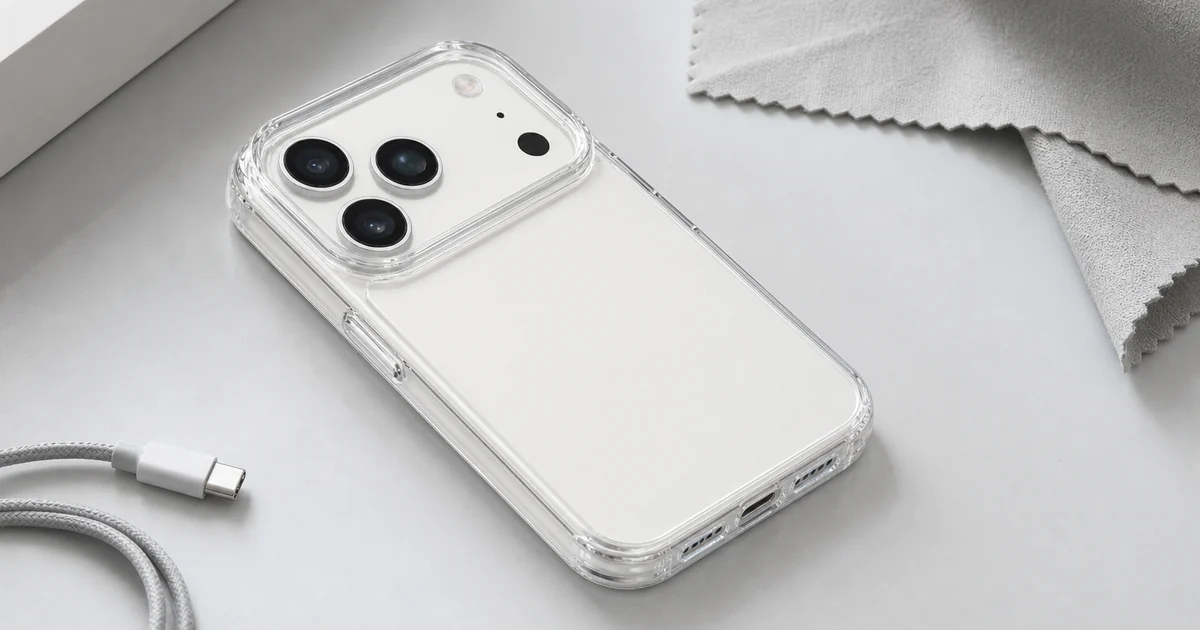
A clear phone case for iPhone 17 Pro or Pro Max should be judged first by model fit, then by the visible case structure. The product covered here is a transparent hard-back case with flexible TPU edges, molded button areas, a raised-looking camera opening and one case included. Treat it as a slim everyday shell for buyers who want to keep the phone color visible, not as an official Apple accessory or a certified drop-protection case.
Choose it if you want a transparent case that keeps the phone design visible while adding a defined edge around the back, sides, buttons and camera area. The most important buying step is selecting the correct iPhone 17 Pro or iPhone 17 Pro Max option, because case fit is model specific.
Do not choose it if you need a proven MagSafe case, a waterproof enclosure, a screen protector bundle or a military drop rating. The product page supports clear-back, TPU-edge and camera-rim discussion; stronger protection promises would go beyond the evidence.
Before choosing, check whether the clear case option matches your phone. iPhone 17 Pro and iPhone 17 Pro Max are separate models, so select the option for the phone you own.
After delivery, check that the camera area is aligned, the side button covers press cleanly, the lower openings are clear, and the corners sit evenly without pulling away.
The gallery shows a clear hard back and transparent, flexible-looking TPU edges. That combination keeps the phone color visible and gives the sides a softer grip surface; it describes the material and handling, not lab-tested protection.
The transparent surface also changes how people maintain the case. Clear material shows lint, fingerprints and pocket dust sooner than dark opaque cases. A dry soft cloth and occasional gentle cleaning are realistic care tips that help the user without promising anti-yellowing performance.
The case should frame the camera area without hiding the lenses or flash. The product photos show a defined transparent rim around the opening; check that it aligns with your phone and avoid pressing on the lenses.
Button fit matters just as much for daily use. A case can look right in a product photo but feel wrong if button covers are stiff, misaligned or too loose. After receiving the case, press each side button, test the bottom opening and confirm the case edge sits flat along the phone.
This guide helps you check whether a clear case fits your iPhone 17 Pro or iPhone 17 Pro Max. Once you have chosen a case, you can also explore screen cleaning, cable organization or hands-free carry options.
Check the product page for the available case option and current purchase details after confirming which phone model you have.
The common mistake is reading a clear case as a promise of invisible heavy protection. A transparent shell can help with everyday coverage, but this product should not be sold as a rugged waterproof case. Buyers who need a high-impact worksite case should look for explicit ratings and construction details.
Another mistake is choosing the wrong model because the phone names sound similar. iPhone 17 Pro and iPhone 17 Pro Max are separate options, so confirm that your selection matches your phone.
This guide is based on the current product page and visible gallery evidence: a clear transparent case, a hard-looking back panel, transparent side edges, corner coverage, molded button areas and a camera opening/rim. Those details justify the fit, material and everyday handling angle.
The same evidence sets the limits. The listing shows one case and uses phones as display context. It does not prove that a phone is included, that a screen protector is included, that the case is waterproof, that it carries a drop rating or that it has MagSafe magnets.
Install a clear case on a clean phone, then press around all four corners instead of forcing one side first. If dust is trapped between the transparent back and the phone, remove the case and clean both surfaces gently before reinstalling. That habit keeps the clear look closer to the product photo.
For daily use, remove the case occasionally and check the edges near the camera and buttons for grit. This helps keep the case clean during regular use.
Use this checklist before treating the case as the right match.
| Check | Good fit | Avoid assuming |
|---|---|---|
| Model | iPhone 17 Pro or Pro Max selected | One size fits both |
| Back | Clear hard-look back panel | Anti-yellow proof |
| Edge | Transparent TPU-style sides | Military drop rating |
| Camera | Open raised-looking camera rim | Lens protection claim |
| Bundle | One case included | Phone or screen protector included |
Compare the exact product, categories and related guides before deciding.
The product page provides model options, so choose the exact iPhone 17 Pro or iPhone 17 Pro Max version before ordering.
No. Treat the phone in images as a display prop. The article and product page cover one clear case.
No. Do not assume MagSafe magnets or wireless charging behavior unless the product page explicitly adds that feature.
Check the camera opening, side buttons, lower openings and all four corners for even fit and easy access.
Install it on a clean phone, wipe fingerprints with a soft cloth and remove trapped dust near the edges when needed.
Oct 16, 2026 by SW SW
Oct 16, 2026 by SW SW
Cookie preferences


