
Oct 11, 2026 / By SW-SW / in Buying Guides Tech & Gadgets
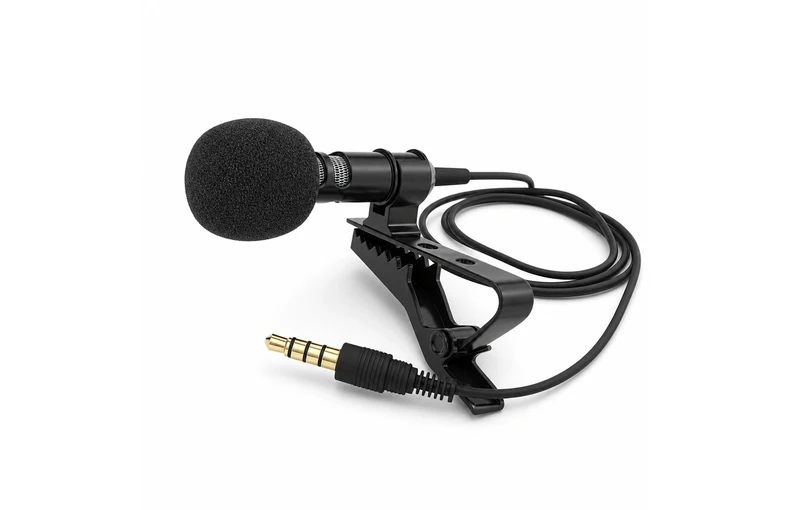
A 3.5 mm TRRS lavalier microphone needs a compatible microphone input, not simply a socket that accepts its plug. Headphone-only outputs cannot receive microphone audio. If your recording device uses USB-C, Lightning or another connection, verify the adapter's input support as well as the device's requirements. For the wired microphone discussed here, no specific device-and-adapter pairing has been tested. Use the checks below to decide what needs confirming before you order or record.
TRRS means tip, ring, ring, sleeve: four conductive sections separated by three insulating bands. TRS has three conductive sections and two insulating bands. These describe different connector arrangements; matching the 3.5 mm diameter alone is not enough. The general TRS/TRRS connection overview explains why the microphone output and receiving input must be considered together.
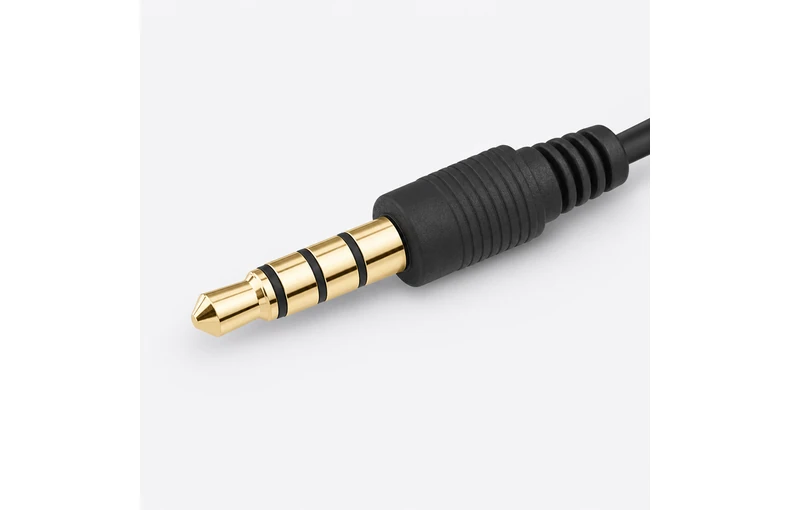
Contact count does not settle every wiring question. The Android headset specification distinguishes CTIA and OMTP microphone/ground arrangements. This item's listing does not identify its pinout. Ask for the exact wiring information when it is necessary to confirm a pairing; do not assume that four contacts establish CTIA compatibility.
A headphone-only socket sends audio out. A microphone input receives audio. A headset input may combine headphone output with a microphone connection, but its wiring still needs to match the accessory. Check the exact device manual rather than judging by the socket diameter or a photograph of another person's setup.
For a computer with separate headphone and microphone sockets, check the microphone socket's requirements. A headset splitter or conversion adapter is not automatically the right solution for this microphone.
The path is microphone plug, any required adapter, device input and recording app. A connector that fits is only one part of that path. The Android USB-C audio-adapter specification includes microphone detection and recording-input conversion as distinct functions. That is a useful requirement to check, not proof that an unspecified adapter supports this item.
Use this table to identify the next check, not to assume that a connection has been tested. No specific device or adapter pairing is verified for this microphone.
| Device connection | What to verify | What it does not prove |
|---|---|---|
| 3.5 mm headset input | Microphone-input support and matching wiring. | Four contacts alone do not verify this pairing. |
| Headphone-only output | A separate compatible recording input. | An output-only socket cannot receive microphone audio. |
| USB-C through an adapter | Recording support, microphone detection and device requirements. | Working headphone playback is not an input test. |
| Lightning through an adapter | Exact adapter documentation and device/app support. | A similar-looking adapter is not a verified substitute. |
| 3.5 mm TRS microphone input | Required TRRS-to-TRS conversion and electrical compatibility. | A passive adapter cannot resolve every mismatch. |
| Separate computer microphone socket | Socket wiring, any required conversion and app input selection. | A headset splitter is not automatically suitable. |
If the destination uses a TRS microphone input, confirm whether a TRRS-to-TRS conversion is required, its direction, and any electrical requirements for the microphone and input. A manufacturer's documented conversion example illustrates this distinction for its own equipment; it does not certify an adapter for the microphone linked here.
For USB-C or Lightning, request documentation for the exact adapter model and device. Do not buy solely because the adapter's product name contains "audio" or because it plays sound through headphones. Recording support and use by your chosen app still need checking.
These are suggested checks for your own setup, not a record of tests performed on this product.
A change in the sound of two samples can be a clue, but it is not definitive proof of the input source. Use the app's input information or device documentation where available. Recheck the app you will actually use rather than assuming success in one recorder applies to every camera, calling or streaming app.
Start with the connection path: is the socket an input, is the adapter documented for microphone recording, and are the connector and wiring requirements satisfied? Next check the recording app's permission and input selection. Headphone playback does not answer those questions.
Change one part of the setup at a time so you can identify what affects the result. If you still cannot establish the recording source, collect the device model, operating-system version, adapter model, app name and observed symptom for support. Do not force a connector or keep buying similar-looking adapters without clarifying the missing requirement.
The wired 3.5 mm TRRS lavalier microphone product page lists one black microphone assembly with its attached cable, clothing clip and foam cover. A phone and adapter are not included. The clip and cover are parts of that assembly, not additional microphones.
The available listing does not provide a verified device compatibility list, wiring standard, cable length or performance measurements. Do not use photographs to estimate those details. Confirm the information relevant to your setup before purchasing, especially if you need a particular adapter or guaranteed device support.
If you also need a phone holder and handle, the smartphone filming-rig setup guide covers that separate decision. A rig's mounting points and LED light do not establish audio compatibility, and accessories shown together in a setup photo are not automatically included in either order.
No. A headphone-only output cannot receive microphone audio. A recording input also needs connector and wiring compatibility; matching the socket diameter does not verify this microphone-and-device pairing.
No. The listing identifies a four-contact TRRS plug but does not state its CTIA or OMTP pinout. Obtain product-specific wiring information when your device or adapter requires it.
No. Playback does not verify microphone detection or recording input. Check the exact adapter's recording support, the device requirements and the input used by your intended app.
Do not assume direct compatibility. Confirm the destination input's wiring and electrical requirements and whether the correct TRRS-to-TRS conversion is needed. No specific conversion adapter has been verified for this item here.
No. The order is one wired microphone with its attached cable, clothing clip and foam cover. A phone and adapter must be supplied separately.
Oct 16, 2026 by SW SW
Oct 16, 2026 by SW SW
Cookie preferences


