
Sep 08, 2026 / By SW-SW / in Buying Guides Product Tips Tech & Gadgets
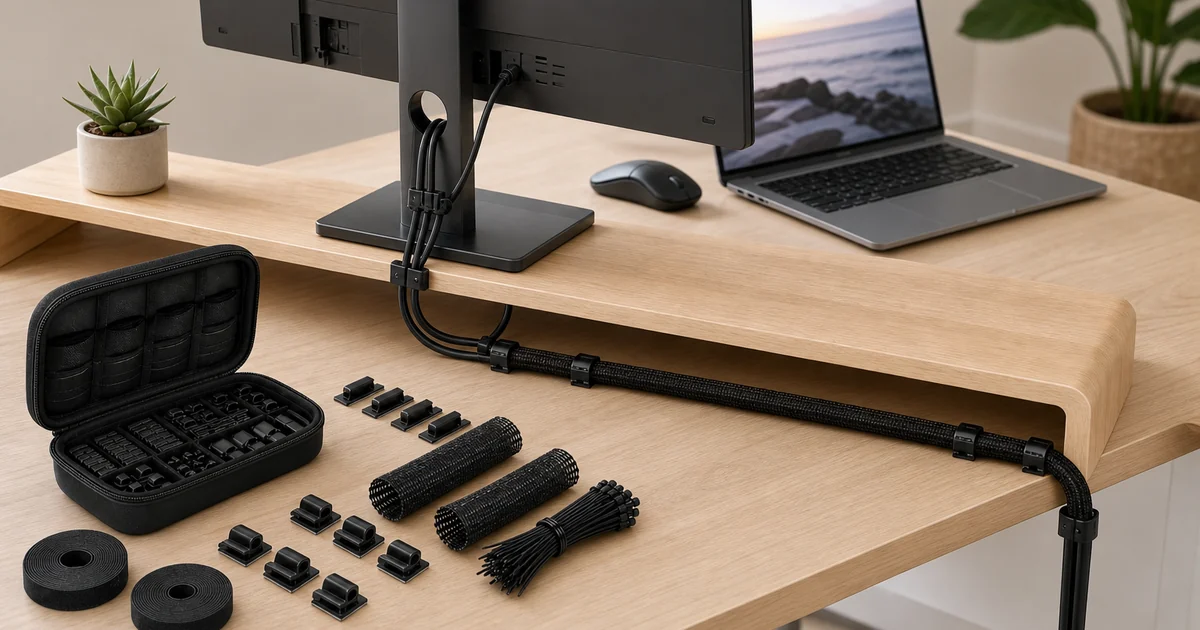
Quick answer: a 139-piece cable management kit is a passive organizer set for grouping computer cables, charger cords, monitor leads and small electronics wiring. It can include sleeves, ties, clips, combs, routing pieces and a storage case, but it does not include cables, chargers, monitors or electrical protection hardware.
This guide focuses on the black SW-SW organizer set for desks, charging zones, entertainment shelves and electronics corners. Use it to plan cleaner routing, not to change charging speed, repair unsafe wiring or make every adhesive surface suitable. Confirm current photos and included pieces on the 139-piece cable management organizer product page.
The useful way to read a large cable set is by component role. Sleeves gather longer cable groups, ties hold temporary bundles, clips guide single cords, combs separate visible runs and the case keeps leftover parts from getting lost. The exact count should always come from the current product page.
This makes the article different from the broader desk cable management guide. That guide covers planning a cleaner charging setup; this page explains how a specific 139-piece kit can be divided between desk, charger and electronics areas.
Map the devices first: computer, monitor, desk lamp, phone charger, speakers and any dock or hub. Then separate cables that rarely move from cables you touch daily. Permanent monitor leads can run together, while charging cords need reachable slack near the front or side of the desk.
For nearby workspace decisions, compare Cables and Organizers, Cables and Adapters, Desk Organizers and Trays, Electronics and Office and School Supplies.
Use a sleeve when several cables travel the same direction for a longer distance. Use clips when one cable needs to stay along an edge. Use ties when you need a bundle that may change later. Use combs or small separators when visible cable lines should stay parallel and easier to identify.
A laptop stand, wrist rest or file tray may improve another part of the workstation, but those products do not replace routing parts. See the foldable laptop stand guide and wrist rest pad guide for separate desk fit decisions.
Surface compatibility is one of the most important limits. Dusty, textured, oily, damp, fragile or heat-exposed surfaces can make clips less reliable. Clean the area, test placement without pulling hard and avoid routes that put constant tension on plugs or ports.
Do not mount organizer pieces where they could trap heat around power adapters, block ventilation or force a tight bend near a connector. Cable organization should make the route easier to inspect, not hide a problem that needs a safer electrical setup.
It cannot provide surge protection, improve charging speed, increase data transfer, waterproof connections, add fire resistance or repair damaged cables. It is a non-electrical organizing accessory. If a cable, outlet, adapter or device looks damaged, solve that issue before adding routing parts.
For travel tech and spare lead storage, the travel digital storage bag guide is a better companion. The cable kit belongs around a fixed desk, TV shelf, gaming zone or charger corner.
A large kit is only useful if the extra parts remain findable. Keep spare ties, clips and routing pieces in the storage case or a clearly labeled drawer. Review the desk after a week because the first route often needs small adjustments once you actually use the devices.
This is where a kit differs from a single clip pack. The case and mixed parts let you handle multiple zones, but the best setup is still staged: start with the most visible mess, then route hidden runs, then use small clips only where you need daily access.
Use this table to match each organizer part to a real cable problem while keeping electrical limits clear.
| Component | Best use | Limit to remember |
|---|---|---|
| Sleeve | Long grouped cable run behind a desk or shelf | Does not fix heat, overload or damaged cords |
| Clip | Single charger or USB cable along an edge | Needs a clean compatible surface |
| Tie | Temporary bundle of spare or moving cords | Do not over-tighten near connectors |
| Comb or separator | Parallel visible cables that need identification | Not a data or power component |
| Storage case | Keeping unused pieces together | Does not mean every part must be used at once |
Start with the 139-piece cable organizer set, then compare Cables and Organizers, Cables and Adapters, Desk Organizers and Trays, Electronics and Office and School Supplies. Related reading includes desk cable management, laptop stand desk setup, wrist rest desk fit and travel cable storage.
The kit is presented as a mixed organizer set with items such as sleeves, ties, clips, combs, routing pieces and a storage case. Confirm the current included list on the product page.
No. The organizer parts help route existing cords. Devices, monitors, chargers, power strips and cables shown in a scene should be treated as props unless the listing says otherwise.
It can help a gaming desk if the route is planned around monitor, power, USB and accessory cables. Leave slack and avoid blocking ventilation or ports.
No. Surface texture, dust, oil, heat and finish can affect grip. Clean and test the location before relying on any mounted routing piece.
No. It is a passive organizer kit. It does not provide surge protection, waterproofing, charging speed improvements, data transfer upgrades or electrical repair.
Oct 16, 2026 by SW SW
Oct 16, 2026 by SW SW
Cookie preferences


