
Sep 12, 2026 / By SW-SW / in Buying Guides Product Tips Tech & Gadgets
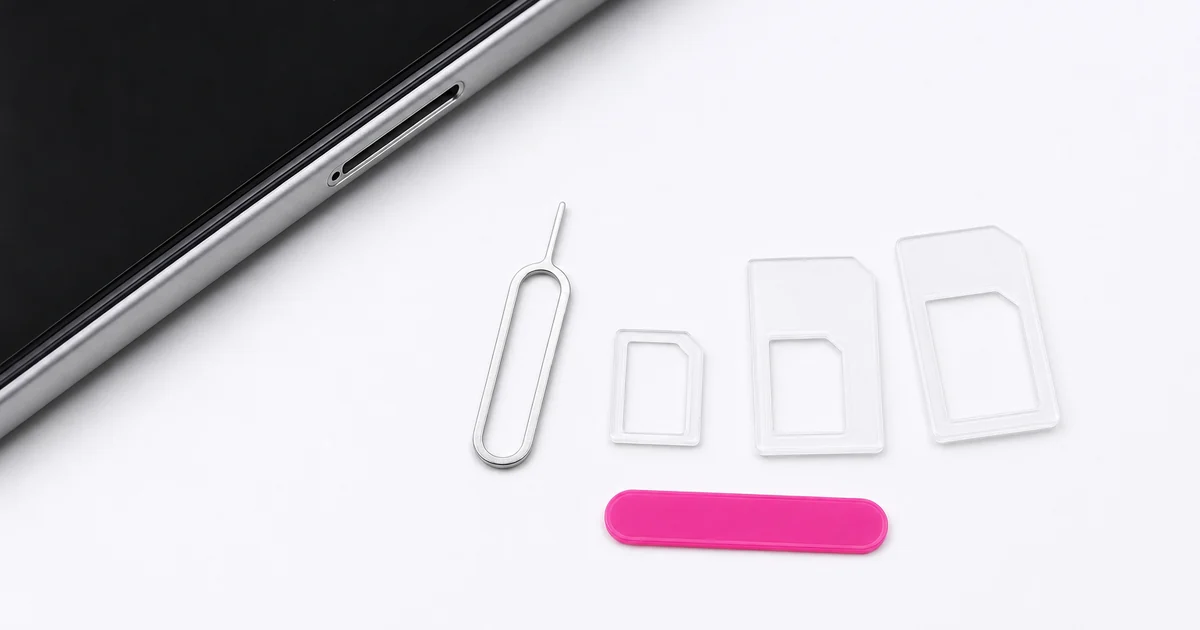
A Nano SIM adapter kit is useful only when the card size, adapter frame and device tray all line up. This guide focuses on the kit shown with three clear plastic adapter frames, a slim silver eject pin and the small pink accessory. Use it to check Nano, Micro and Standard SIM conversion paths, safe tray handling and realistic limits before moving a physical SIM between devices.
Use a Nano SIM adapter kit when you have a smaller physical SIM card and a compatible device tray that expects a larger card outline. The adapter is a mechanical size frame: it helps the card sit in the tray shape, but it does not activate service, unlock a phone, add eSIM support or change network compatibility.
The most important checks are the card size you already have, the tray size your device requires, and whether the adapter holds the card flush without bending. If the tray resists, stop and recheck the frame instead of forcing the phone tray closed.
The product page describes three adapter frames: Nano SIM to Micro SIM, Nano SIM to Standard SIM, and Micro SIM to Standard SIM. That means the useful buying question is not simply whether the kit is cheap or small. The useful question is whether your card and device tray match one of those paths.
Nano is the smallest card format in this guide, Micro sits in the middle, and Standard is the larger outline used by older or larger SIM slots. The adapter fills space; it does not cut, reshape or electronically convert the card.
Before using the eject pin, identify the card and tray size on the device documentation or the old tray insert. A physical tray has very little tolerance. A frame that looks close but sits proud at one corner can cause the tray to catch.
Place the SIM card into the adapter on a flat surface first. The metal contacts should remain exposed as the device requires, and the card should sit level. If it rocks, slips or leaves a raised edge, pick a different frame or stop.
The silver eject pin is for the small release hole beside a compatible SIM tray. Insert it straight and apply controlled pressure until the tray pops out. It is not a general phone-opening tool, a scraper or a lever.
If the tray hole is not visible, if the phone uses a different mechanism, or if the tray is stuck, forcing the pin can damage the device.
A SIM size adapter is a plastic frame. It does not make an inactive SIM work, restore a blocked card, change a carrier plan, bypass a lock, add storage or create an eSIM profile. It also does not guarantee every device accepts every card format.
If service, activation or account status is the problem, the adapter is not the fix.
SIM adapter frames are easy to lose because they are thin and transparent. Keep the three frames, eject pin and pink accessory together in a small pouch or phone-accessory box after choosing the frame you need.
For travel, store the used frame and original card size notes together. That makes it easier to move a physical SIM between backup phones, older devices or local travel phones without searching for a pin at the wrong moment.
Use this checklist before placing a SIM card in an adapter frame.
| Check | Good fit if | Pause if |
|---|---|---|
| Card size | Your SIM matches the adapter opening | You are unsure which SIM size you have |
| Tray size | The outer frame matches the device tray | One corner sits high or loose |
| Pin use | The phone has a release hole | You are trying to pry the tray |
| Service | Your SIM is already active | You expect the adapter to activate service |
| Storage | Frames stay together after use | Loose parts may be lost |
Choose the SIM adapter by the card and tray dimensions. Keep screen-cleaning liquid away from the SIM slot, and store loose frames and the eject pin where they cannot be lost.
No. It only changes the physical outline of a compatible card. Network support, activation and carrier compatibility still depend on the SIM and device.
Use it only on a compatible SIM tray release hole. Do not use it to pry open sealed edges, buttons or speaker holes.
Choose the frame whose inner opening matches your card and whose outer outline matches the receiving tray. If either side is wrong, do not insert it.
No. This kit is for physical SIM cards and physical trays. It does not create, transfer or activate eSIM profiles.
Check the product photos, the three clear adapter frames, the metal eject pin, your device tray size, price and availability on the product page.
Oct 16, 2026 by SW SW
Oct 16, 2026 by SW SW
Cookie preferences


