
Sep 05, 2026 / By SW-SW / in Buying Guides Product Tips Tech & Gadgets
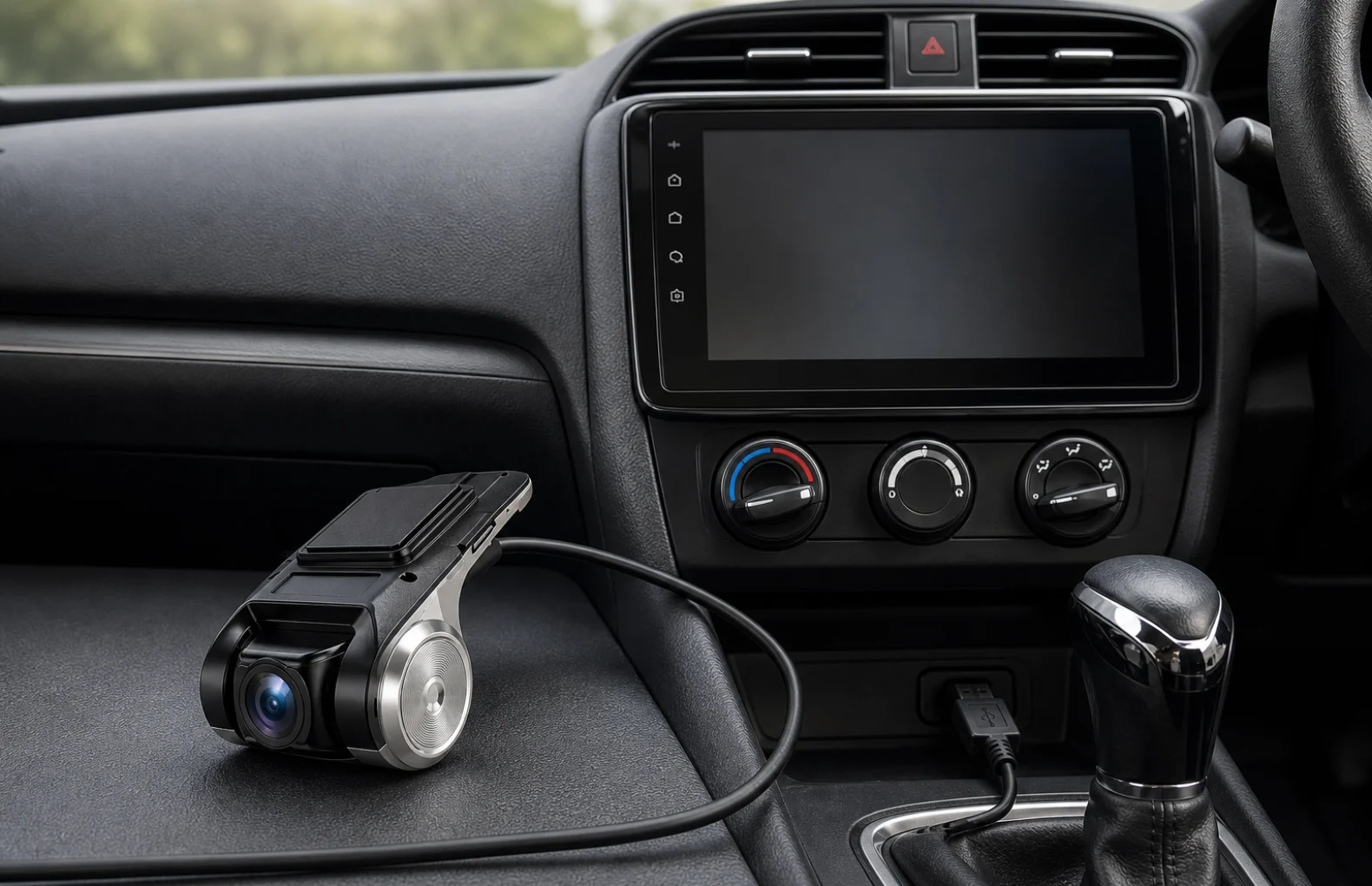
A compact USB car camera for an Android car radio is worth choosing only after the buyer checks the whole setup: head unit support, USB port location, cable route, storage behavior, power timing and privacy expectations. The SW-SW product is a small black camera module with a USB lead, so the realistic use case is a tidy in-cabin or windshield-area accessory connected to an Android radio or compatible head unit. Start with the current mini USB camera listing, compare the broader Automotive section, and check nearby Car Gadgets & Appliances before assuming one camera fits every vehicle.
This guide focuses on recording setup and installation planning, not legal advice or driver-assistance claims. If you are still comparing camera categories, the existing USB car camera compatibility guide covers head-unit fit, the 720p USB dash cam guide covers a different dash-camera style, the 9-inch multimedia display guide explains screen decisions, and the car interior LED strip guide helps plan cable discipline inside the cabin.
Check that the Android radio or head unit can read a USB camera, that the chosen USB port remains powered when you need recording, and that storage can be managed without blocking normal audio, map or phone functions. Then decide where the small camera body can sit without obstructing the driver, passenger airbags, vents or controls.
The safest buying decision is not based on the camera size alone. A tiny module can still become annoying if the cable crosses the dashboard, if the port is shared with phone charging, or if the recording app needs permissions the driver does not want to leave active.
The first practical question is whether the radio accepts a USB camera input. Some Android head units recognize UVC-style USB video devices easily, while others reserve ports for media, firmware, CarPlay adapters or charging. A buyer should check the radio manual, settings menu, installed camera app and current USB accessories before adding another device to the same system.
Port position also matters. A front-facing USB socket is easy to test but can leave the cable visible. A rear or glovebox cable can look cleaner but takes more planning and may require removing trim. If the head unit has multiple USB leads, label them during testing so the final installation does not depend on guesswork.
The camera should have a stable view and a short, protected cable path. Many buyers think first about lens angle, but the mounting surface is just as important: a glossy dashboard can reflect light, a soft textured panel may not hold adhesive cleanly, and a vent area can expose the camera to heat or movement. The small body shown on SW-SW makes neat placement easier, but it still needs a surface that will not shake constantly.
Route the cable along existing dashboard edges, console gaps or trim seams where it can be tucked without pinching. Avoid steering-column movement, pedals, shifter travel, airbag covers and sharp bends near the USB connector. A clean cable route is both a visual issue and a reliability issue because tugging on a USB lead can interrupt recording.
Recording is only useful if the files are easy to manage. Before everyday use, test whether the app records to internal storage, a card, USB storage or the head unit memory. Then check clip length, overwrite behavior, date stamping and whether files can be reviewed without stopping other head-unit functions. Buyers who already use the Android radio for navigation or music should test camera operation while those apps are active.
Privacy deserves a plain answer. A small car camera can record people, parking areas and private routes, so the driver should know when it is active and how clips are deleted. Local rules differ by place; this article does not replace legal guidance. Before daily use, check how to control recording, storage and sharing.
This accessory is best understood as a compact USB module that depends on the Android radio. A full dash cam may include its own screen, battery behavior, card slot, parking mode or standalone controls. The smaller module can be cleaner in a car that already has an Android display, but it may depend more heavily on software settings, USB power and the head-unit interface.
If the driver wants a self-contained device with dedicated recording controls, compare dash-cam style options first. If the goal is a small camera that works through the existing head unit and keeps the cabin visually simple, this SW-SW item is closer to the right path.
| Setup decision | Good sign | Check before buying |
|---|---|---|
| Android radio support | Head unit recognizes USB video input | Manual, settings menu and app availability |
| USB cable route | Cable can follow trim or console gaps | Airbags, steering movement, pedals and heat |
| Storage workflow | Clips save predictably and can be deleted | Overwrite rules, timestamps and free space |
| Daily visibility | Small body does not block the driver | Glare, vibration and passenger view |
| Privacy control | Driver knows when recording is active | Local rules, passengers and file sharing |
After installation, test short daytime and nighttime clips, then review them on the actual head unit. Check whether the camera moves after braking, whether the USB plug loosens, and whether glare from the dashboard reduces the useful image. These small checks matter more for a compact accessory than a dramatic product promise.
Consider this compact USB camera if you use a compatible Android car radio and are prepared to manage cable routing, recording storage and privacy. If you need a standalone dash cam with its own screen and controls, compare a different type of device.
No. The head unit must support USB camera input or a compatible recording app. Check the exact radio model before buying.
Not always. It depends on the Android radio for power, viewing and recording behavior, while a full dash cam may have standalone controls.
Use trim edges, console gaps or protected paths that avoid pedals, steering movement, airbags, sharp bends and hot vents.
Know when recording starts, where clips are stored, how they are deleted and whether local rules affect filming in the vehicle.
Compare the Automotive category, Car Gadgets & Appliances, the USB compatibility guide and the 720p dash cam guide before choosing.
Oct 16, 2026 by SW SW
Oct 16, 2026 by SW SW
Cookie preferences


