
Sep 08, 2026 / By SW-SW / in Buying Guides Tech & Gadgets
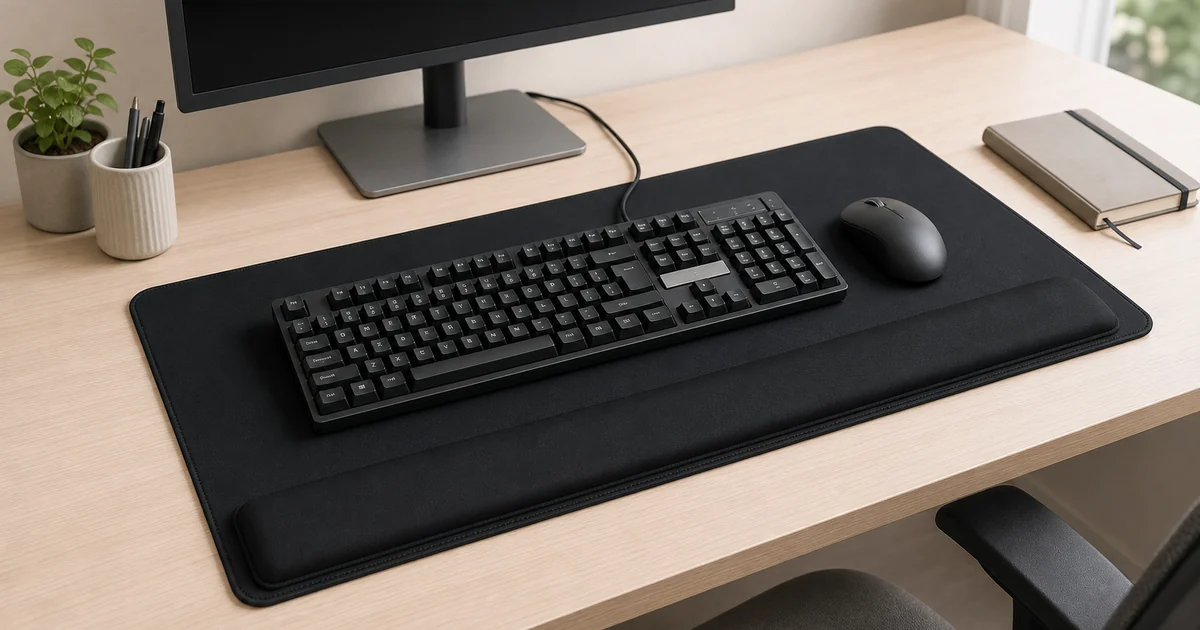
A keyboard wrist rest pad is a desk accessory for people who want one continuous surface for keyboard, mouse movement and light palm support. The right choice depends less on one comfort promise and more on whether the pad fits your desk depth, keyboard width, mouse range and daily typing posture.
The SW-SW version is a large black memory foam pad with a raised front cushion, cloth top, stitched edge and non-slip rubber base. It suits everyday office, study and simple gaming-style desks, but it should be treated as a setup and comfort aid, not as a medical treatment.
A large pad makes sense when your keyboard, mouse and forearm area feel fragmented across a hard desk. One continuous surface can reduce edge friction, keep the mouse on the same plane as the keyboard, and make a workstation look more deliberate.
It is not automatically better for every desk. If your desktop is shallow, your keyboard tray is narrow, or you prefer a separate compact wrist rest, a smaller solution may fit better. The first ranking question is fit, because even a good cushion feels awkward if it steals needed mouse space.
Measure the width from your left typing edge to your farthest mouse movement. Then measure depth from the monitor stand or laptop base to the front edge where your palms rest. Leave room for the raised cushion rather than placing it half off the desk.
The listed product size is about 665 × 310 × 25 mm, so compare those numbers with your real setup. If you use a full-size keyboard with number pad, a large mouse sweep, notebooks or desk organizers, map the layout before buying.
The raised front area gives the palm base a softer landing zone during pauses between typing or mouse work. It can make a hard desk edge feel less harsh, especially during long reading, browsing, editing or light office tasks.
It should not force the wrist into a bent position while typing. The best setup keeps shoulders relaxed, elbows comfortable and hands moving naturally. If you feel numbness, sharp pain or persistent discomfort, change the workstation and ask a qualified professional rather than relying on any pad.
A cloth top should allow smooth mouse movement while feeling stable under the keyboard. Memory foam gives a slow-rebound cushion feel, but density and desk pressure determine whether it feels supportive or too soft for your preference.
The stitched edge helps the border resist daily rubbing, and the rubber base helps keep the pad in place when the keyboard moves. These details matter more than decorative claims, because desk accessories are touched and shifted every day.
For office work, the pad can unify typing, document review and mouse use. For study, it creates one predictable surface for laptop notes, an external keyboard and a mouse. For light gaming, the main question is whether the mouse area is large enough for your sensitivity.
It is less suited to very small desks, heavy food-and-drink use, or setups where the keyboard must be moved often. If you already use a tall mechanical keyboard, compare keyboard height with cushion height so the front ridge supports pauses rather than fighting your typing angle.
Keep the surface clean with gentle routine care, and follow the current product page for material notes. Avoid soaking memory foam, placing hot items on the pad or folding it sharply. Let it dry fully before returning electronics to the desk.
Foam products can compress with use, especially under constant pressure. That does not mean the product failed overnight, but it does mean buyers should choose based on realistic desk comfort, surface organization and replaceability rather than expecting permanent therapeutic results.
Use this decision table to match the desk accessory to your space, keyboard and mouse habits.
| Setup need | Best fit | Check before choosing |
|---|---|---|
| Keyboard and mouse need one surface | Large wrist rest desk pad | Desk depth and mouse sweep |
| Only keyboard edge feels hard | Compact keyboard wrist rest | Keyboard height and length |
| Fast wide mouse movement | Large gaming-style mouse pad | Available width and friction |
| Small laptop desk | Slim mat or no pad | Front edge space and cable path |
Use these SW-SW links to compare the wrist rest pad with desk categories and related organization guides before changing your workstation.
No product should be treated as a medical prevention tool. It may improve surface comfort, but persistent pain should be discussed with a qualified professional.
Measure desk width, depth and mouse movement. Compare your layout with the current product dimensions and leave room for the raised front cushion.
Yes, this style combines keyboard and mouse space on one large surface with a raised front rest, so mouse range is a key buying check.
Memory foam can compress with regular pressure. Use it for comfort and surface organization, and avoid expecting permanent shape or medical-grade support.
Follow current product care notes. In general, avoid soaking foam, use gentle surface cleaning and let the pad dry fully before using electronics again.
Oct 16, 2026 by SW SW
Oct 16, 2026 by SW SW
Cookie preferences


