
Sep 08, 2026 / By SW-SW / in Buying Guides Product Tips Tech & Gadgets
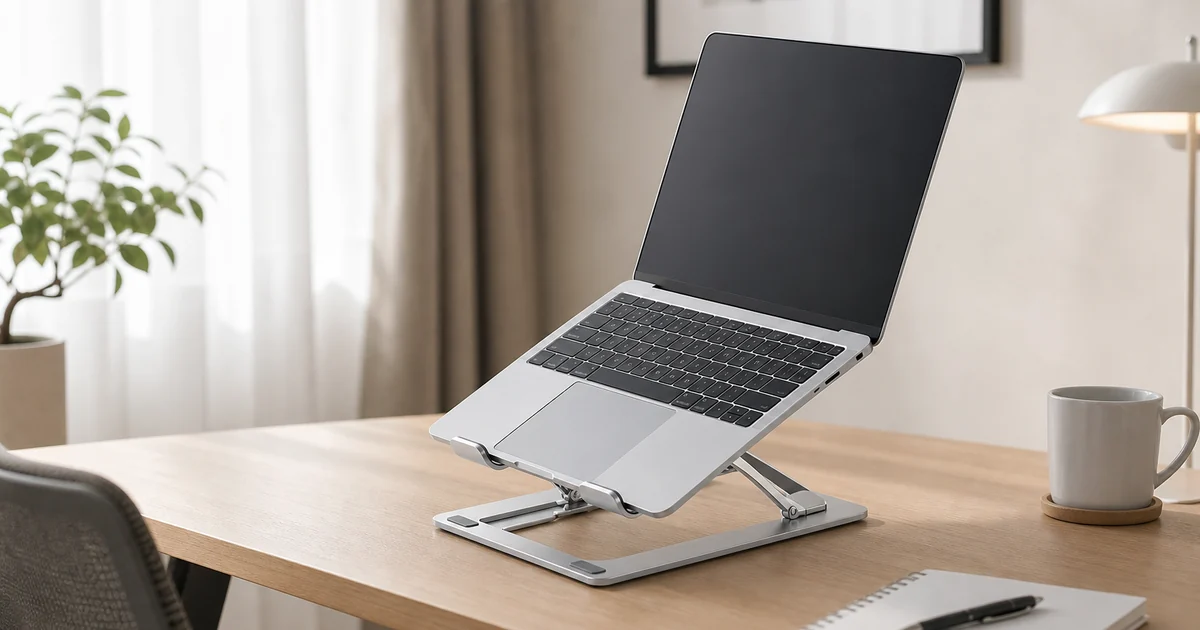
Quick answer: a foldable aluminum laptop stand is best for shoppers who want to raise a laptop or tablet off the desk, keep the screen easier to view, and still fold the stand flat for school, home office, shared workspaces or travel. Choose by visible stand shape, angle adjustment, silicone pad placement, front hooks and the device size shown on the current product page.
This guide focuses on the SW-SW stand, a slim silver aluminum frame with X-style support arms, hinge pivots, front retaining hooks and gray contact pads. Use it as a desk accessory, not as a medical posture product or a guaranteed cooling device. Confirm current photos, price and listing details on the Foldable Aluminum Laptop Stand product page before ordering.
Start with the device you plan to place on the stand. A stand may look universal in photos, but fit depends on laptop width, depth, bottom shape and how the front hooks meet the lower edge. If you use a tablet, check whether the viewing angle and hook height match the case you keep on it.
The most useful buying test is simple: imagine the exact desk, dorm table, hotel desk or shared workspace where the stand will sit. Then compare the SW-SW gallery with related categories such as Office and School Supplies, Electronics and Devices and Accessories.
An aluminum frame is useful because it can stay slim while giving the stand a firm shape. The SW-SW model shows a silver folding structure rather than a bulky riser, so the appeal is portability and tidy desk use. Buyers who want a permanent monitor-height platform may prefer a larger riser instead.
Look closely at the hinge points and support arms. They are the parts that open, carry pressure and fold back down. The product should look symmetrical, with contact pads placed where the laptop bottom and desk base meet the stand. Good photos matter because small stand details are hard to judge from text alone.
Angle adjustment is about matching a comfortable viewing setup, not chasing a perfect posture claim. A steeper angle can raise the screen, while a lower angle may feel steadier for quick typing. If the product page lists specific positions or images them clearly, rely on those visible details rather than assuming every angle is supported.
For long typing sessions, a stand works best with an external keyboard and mouse. That is where related desk pieces become useful: the large keyboard and mouse wrist rest pad guide covers a different part of the workstation, while this article stays focused on the laptop support.
Yes. Silicone contact pads help separate the device from bare metal, and the front hooks help keep the lower edge from sliding forward. They do not make every device automatically secure, but they are important visible checkpoints when comparing stands.
Check whether the pads appear on the base, upper arms and hook area. Also check whether the hooks look tall enough for the device or tablet case you plan to use. A thick protective case can change how the device sits, so product photos should be treated as the first source of truth.
A fold-flat laptop stand is useful when the same accessory moves between a home desk, a school bag, a coworking table and a suitcase. It should take up less room than a fixed riser and be easier to store in a drawer. The tradeoff is that very compact stands usually have less surface area than permanent desk platforms.
If you pack tech accessories together, compare this guide with the travel digital storage bag guide. The bag helps organize chargers and small devices; the stand handles screen height and desk layout. Keeping those roles separate prevents the article from becoming a generic travel tech list.
Raising a laptop can free some surface space beneath and around the device, but it does not solve cable clutter by itself. Place chargers, adapters and USB-C cables where they do not pull against the laptop or the stand. If cable routing is the real problem, use the desk cable management guide as the companion article.
For paper-heavy workstations, a laptop stand may pair with desk sorting rather than replace it. The clear 4-tier desk file tray guide is better for folders, mail and notebooks. The stand belongs to the screen-and-device zone of the desk.
Use this table as a buying checklist. It keeps the decision tied to visible product facts rather than broad comfort promises.
| Checkpoint | Why it matters | Verify before ordering |
|---|---|---|
| Laptop or tablet size | Determines whether the base and hooks make sense | Current listing photos and any stated device range |
| Angle adjustment | Affects viewing setup and typing feel | Visible hinge positions or listed adjustment method |
| Silicone pads | Separate device and desk from bare metal contact | Pad placement on arms, hooks and base |
| Folded shape | Decides travel, drawer and bag fit | Fold-flat gallery photo or stated folded size |
| Desk role | Prevents overbuying the wrong accessory | Whether you need a stand, riser, tray or cable organizer |
Skip a compact foldable stand if you need a large permanent platform, a built-in keyboard tray, a docking station or a verified load rating for heavy hardware. The better match may be a fixed desk riser, monitor arm or dedicated laptop dock. A foldable aluminum stand is strongest as a small, portable support accessory.
Also avoid assuming the stand will make every setup comfortable on its own. Screen height, chair height, typing time and lighting all matter. If your workspace includes an e-reader or tablet case, the Kindle Scribe folio stand guide shows a separate compatibility-check mindset for device covers.
Start with the foldable aluminum laptop stand, then compare nearby shopping paths in Office and School Supplies, Electronics, Devices and Accessories and Desk Organizers and Trays. Related reading includes desk cable management, wrist rest desk fit, travel cable storage, desk file sorting and device folio stand checks.
It is best for raising a laptop or tablet during desk, study or travel work while keeping the stand easy to fold and store. It is a compact support accessory, not a medical posture device.
Use the current product page as the source for supported device details. In general, compare your laptop width, depth and lower-edge shape with the stand photos before ordering.
A fold-flat design is meant to be easier to pack than a fixed riser, but bag fit depends on folded dimensions and your bag layout. Check the gallery and listing details first.
Silicone pads help separate the device and desk from direct metal contact. Their placement on the arms, hooks and base is a key photo check for this type of stand.
Check device fit, visible angle settings, hook height, pad placement, folded shape and the return policy. Avoid assuming load limits or comfort results that are not stated.
Oct 16, 2026 by SW SW
Oct 16, 2026 by SW SW
Cookie preferences


