
Aug 31, 2026 / By SW-SW / in Buying Guides Tech & Gadgets
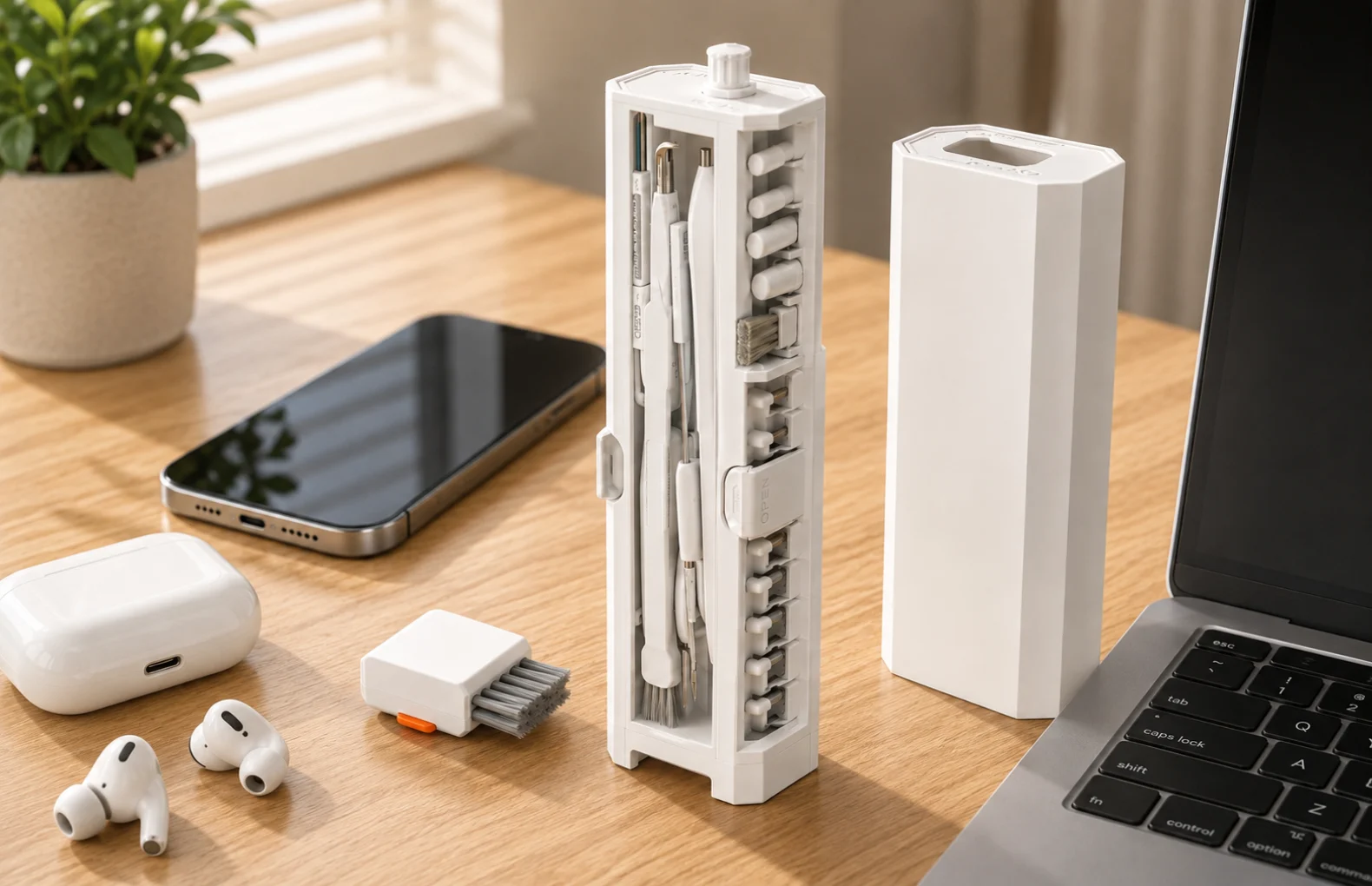
A 32-in-1 electronics cleaning kit should be judged by dry tool control, not by vague promises about making every device new. The SW-SW 32-in-1 electronics cleaning kit is a compact case with small brushes, pen-like tools and detail tips for phone screens, keyboards, earbuds and desk devices, so the key question is practical: which tool helps with dust, crumbs and small gaps without pushing buyers into risky liquid or repair claims?
This guide is for shoppers browsing Cell Phones and Accessories, Electronics and Cleaning and Maintenance who want a clear routine before they buy. It also connects with the iPhone tempered glass screen protector guide, the desk cable management guide and the 2MP SPI camera module guide, because clean screens, tidy desks and small electronics care often sit in the same purchase journey.
Choose a compact dry cleaning kit when the problem is dust, lint, keyboard crumbs, screen smudges, earbud mesh debris or small gaps around cases and desk tech. The right use is gentle surface cleaning and routine maintenance, not disinfection, water resistance, internal repair or brand-certified service. Check that the case holds tools neatly, that brush sizes match phones, keyboards and earbuds, and that you can follow the device maker care instructions. Avoid forcing tools into ports, using liquids that are not recommended or claiming the kit fixes hardware faults.
The 32-in-1 electronics cleaning kit is intended for dry surface care. Choose a tool for the surface you need to clean. Use a soft brush for loose keyboard debris and a clean screen cloth only as directed by the device manufacturer. Earbud mesh and openings are delicate: keep tools on accessible outer surfaces and never push tips into them.
Where the device maker permits blower cleaning on accessible exterior surfaces, compare a manual camera air blower with five styles as a separate dry-care option, not an included part of this 32-in-1 kit. Each unit is one selected style, with a minimum order of two units. Do not direct airflow into ports, earbud mesh or device interiors; the listing does not establish sensor compatibility, filtration or antistatic performance.
The Cell Phones and Accessories and Electronics categories show why the same household may need care for phones, laptops, headphones and camera accessories. For screen decisions, the iPhone tempered glass screen protector guide can help with screen preparation because dust control before installation can affect how a protector sits.
A dry kit works best when it becomes a repeatable desk habit. Start with the device powered off if the maker recommends it, remove loose crumbs with light brushing, wipe the screen gently and close the storage case when the tools are clean. This is different from spraying liquid near a device or digging into ports.
The desk cable management guide pairs well with this topic because clutter makes cleaning harder. A desk with tangled charging cords traps dust and hides crumbs, while a tidy cable path gives the brushes room to work. Keep cables out of the way so the surrounding desk surface is easier to reach during cleaning.
Treat this as a manual surface-cleaning kit for visible dust, crumbs and smudges. Dry brushing does not establish disinfection, antimicrobial protection, waterproofing or repair capability. Follow the device manufacturer's instructions when choosing a tool and deciding where it can be used.
Small electronics also overlap with hobby devices. The 2MP SPI camera module guide gives a nearby context for careful handling of tiny components, but this kit is for external surface care. It is not a precision electronics repair tool and not a replacement for manufacturer instructions.
Before starting, identify the surface, choose a suitable clean tool and check the device manufacturer's care instructions. Stop if cleaning requires force or access inside the device.
| Device area | Useful tool style | Limit |
|---|---|---|
| Phone or tablet screen | Soft wipe or screen pad | Do not soak the device or press hard. |
| Laptop keyboard gaps | Small brush with light strokes | Do not push debris deeper into keys. |
| Earbud surface and case | Fine brush and gentle tip | Avoid forcing anything into speaker mesh. |
| Desk device seams | Detail brush | External surface care only. |
| Tool storage | Compact vertical case | Keep brushes dry and clean before closing. |
Dry surface cleaning is not a substitute for disinfection, sterilization, battery or port repair, or data protection. Different devices need different care; do not assume a tool is suitable simply because it fits near an opening.
Check the current product photos for the rectangular storage case, brush shapes, tip sizes and included pieces. Compare these details with the surfaces you plan to clean. Phones, keyboards or earbuds shown beside the kit are not proof that those devices are included; use the package list to confirm the contents.
Start with the 32-in-1 electronics cleaning kit for the tool set. Compare Cleaning and Maintenance, Electronics and Cell Phones and Accessories for adjacent categories. For screen prep read the iPhone tempered glass screen protector guide, for a cleaner desk use the desk cable management guide, and for small-device care context see the 2MP SPI camera module guide.
No. Treat it as a dry manual cleaning kit for visible dust, lint and smudges, not as a sanitizer or medical device.
Use light brushing and avoid pushing debris deeper. Follow the device maker guidance, especially on laptop keyboards.
Do not force tools into ports. If a port has a serious issue, follow manufacturer support rather than scraping inside it.
No. The value is having organized options for different areas; most routines only need a few tools at a time.
Check the case layout, brush shapes, tip sizes and included pieces against the package list. Compare them with your device's care instructions; photos alone do not establish compatibility or cleaning safety.
Oct 16, 2026 by SW SW
Oct 16, 2026 by SW SW
Cookie preferences


