
Sep 10, 2026 / By SW-SW / in Buying Guides Product Tips Home & Lifestyle
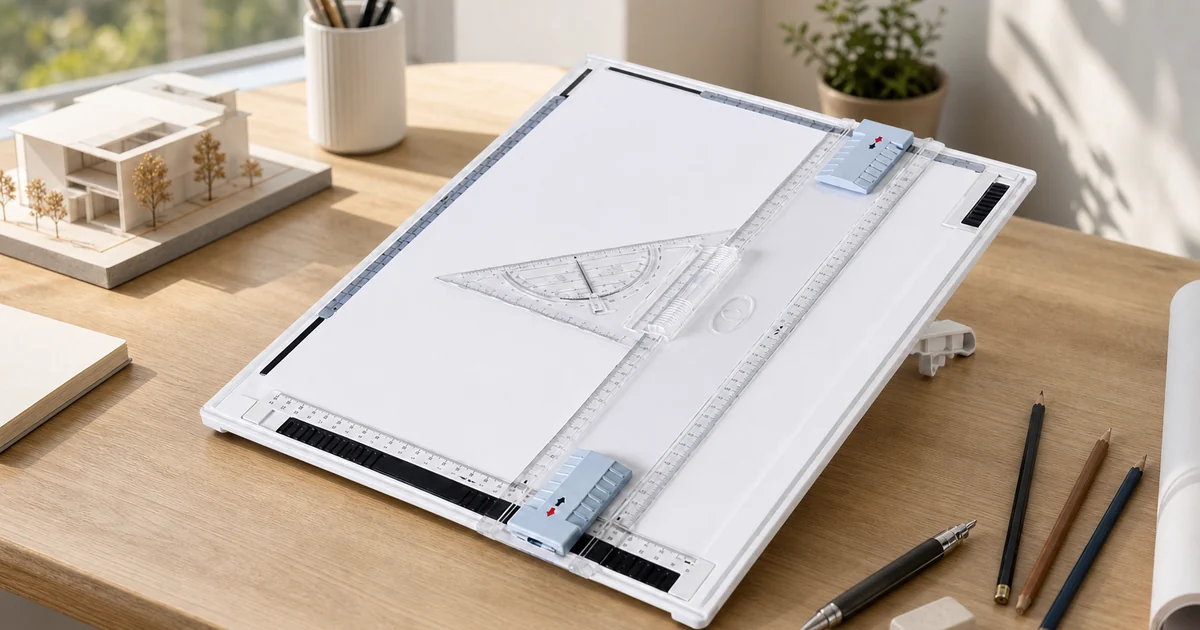
Manual drafting is still useful when you want paper, scale and hand control in the same workspace. This guide explains how to evaluate the SW-SW A3 drawing board for school, architecture sketches, technical drawing practice and clean desk setup. It focuses on the visible board, sliding parallel ruler, clips, transparent triangle guide and support stand, while keeping expectations realistic for a lightweight manual tool.
Use an A3 drawing board with a parallel ruler when you need a compact tabletop surface for straight-line layout, student drafting practice, sketch planning or neat paper-based technical work. The parallel ruler helps keep horizontal references consistent, while the paper clips and triangle guide support positioning and angle checks.
This is not a digital tablet and should not be treated as a professional drafting machine. It is best for learners, hobbyists, design students and home-office users who want a manual board that brings the ruler, paper hold-down and guide pieces into one portable workspace.
A3 size gives more drawing area than common notebook paper while still fitting many study desks. That balance is why it often appears in student drafting, architecture sketching, craft layouts and technical drawing practice. Before buying, measure the desk area where the board will sit, including room for your forearm, pencils and eraser.
The board works best when it can stay flat and stable. If it hangs over the desk edge or has to share space with a laptop, the ruler movement can feel cramped. A clean surface, good lighting and a small tray for pencils make the drawing process smoother than trying to use the board in a crowded corner.
The sliding ruler is the main reason to choose this style over a plain drawing board. It gives a repeatable horizontal reference across the paper, so title blocks, margins, floor-plan lines and measured sketches stay easier to align. That does not remove the need to check your marks, but it reduces the amount of repositioning needed.
Move the ruler gently and keep the rail area clean. If dust, paper fibers or heavy pressure interfere with sliding, the experience becomes less accurate. The best workflow is slow and deliberate: position the sheet, clip it, set the ruler, draw the reference line and recheck before building more geometry from that line.
Paper hold-down is easy to underestimate. Even a small shift can make a border, room outline or measured sketch look slightly off. The visible clip points on this SW-SW board help keep the sheet in place while the parallel ruler passes over the surface. Clip first, then align the edge with the ruler.
If the paper is curled from storage, flatten it before drafting. Heavy or textured paper may behave differently from thin practice sheets, so test the clips with the paper type you plan to use. A stable sheet lets you focus on layout decisions instead of fighting movement after every line.
The transparent triangle guide supports basic angle work, border checking and repeated layout marks. Because it is see-through, you can view the line underneath while placing the guide. That makes it useful for students learning clean geometry or hobby users laying out simple plans, labels and craft patterns.
The guide is still a manual accessory, so it depends on steady handling. Keep the edge clean and avoid dragging it across wet ink or soft pencil areas. Used together with the parallel ruler, the triangle can make the board feel more complete than a flat clipboard, especially for repeated school assignments or sketch studies.
If your paper layout will include repeated lettering, the letter and number stencil layout guide explains how to check character spacing before adding paint. Plan the arrangement in pencil first, then move any painting step to a separate, suitable work surface; this does not establish that the drawing board or its guides can be painted on.
This product belongs in the manual drawing category. It does not connect to software, display digital artwork or replace a professional studio drafting table. The right buyer is someone who wants a compact, physical surface with a parallel ruler and guide parts for practice, study and everyday layout work.
For high-stakes architectural production, confirm the tolerance and workflow requirements of your course or workplace. For learning, sketch planning and home projects, the board can be a useful step up from loose paper and a separate ruler because it keeps the main tools together and reduces setup time.
Use this checklist to decide whether the board fits your paper size, desk and drawing workflow.
| Need | Best fit | Watch out |
|---|---|---|
| A3 paper practice | A compact board gives room for larger sheets. | Measure your desk before ordering. |
| Straight reference lines | The parallel ruler reduces repeated repositioning. | Move it gently and keep rails clean. |
| Stable paper | Clips help hold the sheet while drawing. | Curled or thick paper may need extra care. |
| Digital artwork | Choose a tablet instead. | This is a manual paper-based tool. |
These links connect the board to product details, office supplies, drawing tools and related art workflows.
Yes, if the student needs a manual paper workspace for technical drawing practice, layout exercises or architecture-style sketches. It gives more structure than loose paper and keeps the parallel ruler, clips and guide pieces in one setup.
The parallel ruler helps create repeated horizontal reference lines and aligned margins across the sheet. It reduces constant repositioning compared with a loose ruler, but you should still check alignment before drawing final lines.
No. This is a manual board for paper, pencils and drafting tools. If you need software input, pressure-sensitive drawing or screen-based illustration, a digital tablet is the correct category instead.
Paper clips help stop the sheet from shifting while you move the ruler or triangle guide. Stable paper makes borders, layout lines and repeated measurements cleaner, especially during student practice.
Check product photos, included board components, A3 size fit, ruler and guide layout, clip positions, price and availability. Also measure your desk so the board can sit flat with room for your hand and tools.
Oct 16, 2026 by SW SW
Oct 16, 2026 by SW SW
Cookie preferences


