
Aug 15, 2026 / By SW-SW / in Buying Guides Tech & Gadgets
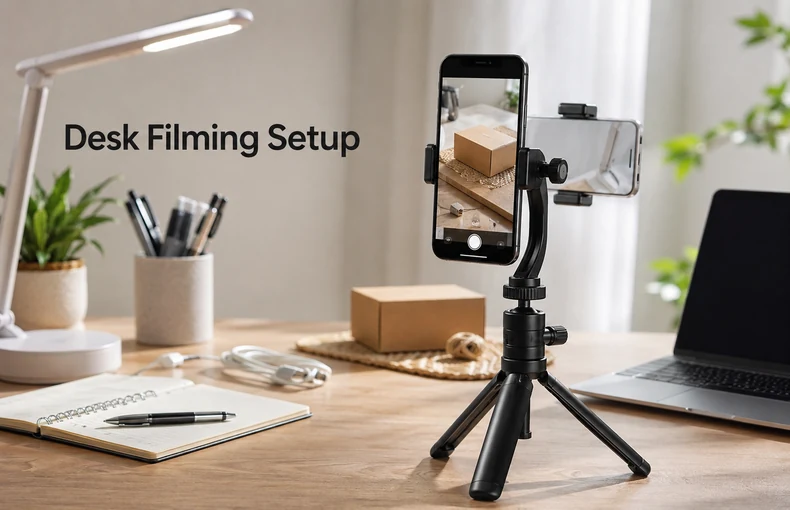
A smartphone tripod mount is a small part of a desk setup, but it can change how steady your videos, calls and simple product photos feel. Instead of leaning a phone against a mug, laptop or stack of books, a universal 1/4 inch smartphone tripod mount gives the phone a proper grip point on a compatible tripod, desk arm or selfie-stick style support.
This guide is for creators, students, remote workers, small shop owners and home cooks who want a cleaner way to record from a desk. It focuses on practical fit, simple setup and real limits. A passive phone mount is not a charger, stabilizer, tracking camera or full filming rig. Its job is simpler: hold a compatible phone firmly enough that you can frame the shot and use both hands.
The strongest use case is fixed-position filming. A phone tripod holder works well when your camera angle does not need to move every few seconds: video calls, online lessons, recipe steps, craft tutorials, desk reviews, packing videos and small product shots. If you already have a tripod with a standard 1/4 inch screw, the mount becomes the bridge between that support and your phone.
This is useful for people who already record with a smartphone but do not want a bulky setup. A compact holder fits creators who film short clips, sellers who need simple product angles, students who join calls from a small desk and home users who want a steadier recipe or craft view. It also fits naturally with other cell phone accessories and practical phone parts and accessories.
If your desk also has tangled chargers, pair the setup with the desk cable management guide. If your phone needs daily protection before it goes into a clamp, the shockproof phone case guide is the next useful read.
Start with fit. The SW-SW phone holder is intended for many 4-7 inch smartphones, but very thick wallet cases, large pop grips or unusual phone shapes can reduce the usable range. Then check the connection: a 1/4 inch mount only works when the tripod, arm or support has a matching screw. Finally, think about orientation. A useful holder should let you set portrait for calls and short videos, or landscape for wider product shots and tutorials.
If you need another angle-adjustment point, compare a mini ball head with a 1/4-20 top screw. Its base uses a female 1/4-inch thread, so check both connections against your support and phone holder. It does not grip a phone by itself; keep a separate compatible holder and test the assembled setup before filming.
Place the tripod on a flat surface first, then attach the mount before adding the phone. Tighten only enough to hold the mount in place. Put the phone into the clamp slowly, checking that side buttons, ports and camera lenses are not blocked. If you are filming a product or craft step, use the phone screen to frame the shot before recording.
For video calls, lift the phone near eye level so the angle looks more natural. For recipes and crafts, place the object on a clear surface and keep the tripod legs outside the working path. For simple product photos, use a clean background, wipe the item first and avoid mixed color light. A phone holder will not fix poor lighting, but it removes the biggest shake and framing problem.
For a separate tabletop product-display platform, see the 13.8 cm rotating display stand size and power guide. It is not a phone support: assess object fit and the listed load separately. Battery charging, the timing basis and stability under load remain unconfirmed.
If you often carry small gear between work, errands and travel, the everyday carry essentials guide can help you decide what belongs in the same bag. For content that involves food or small kitchen tools, the digital kitchen scale guide shows how practical desk-level images can support buyer decisions.
A universal phone mount does not make every tripod stable. If the tripod is too light, the whole setup can tip. If the clamp grips over thick case edges, the phone may sit unevenly. If the mount is used in a moving car, windy outdoor spot or overhead rig without support, risk increases. It is best used for controlled, parked or indoor setups where the support under it is steady.
It is also not an image quality upgrade by itself. Better framing helps, but lighting, background and camera settings still matter. Treat the holder as a practical positioning tool, not a promise of professional studio results.
A phone tripod mount is worth considering because it solves an ordinary but annoying problem: the phone needs to stay still while your hands do something else. For a modest desk setup, it can make calls cleaner, tutorials easier and small product shots more consistent. It is a quiet accessory, but for people who use a phone as a daily camera, it earns its place quickly.
It is intended for many 4-7 inch smartphones, but very thick cases, wallet cases or attached grips may reduce the fit. Check the clamp range and remove bulky accessories if needed.
It connects a smartphone to a compatible tripod, desk arm or selfie-stick style support that uses a standard 1/4 inch screw.
Yes. It can place the phone at a steadier and more comfortable angle than laying it on a desk, especially when paired with a stable tabletop tripod.
It can help with simple product photos by keeping framing consistent. Lighting, background and focus still matter, so test the setup before taking final images.
Check phone size, case thickness, 1/4 inch compatibility, orientation adjustment and the stability of the tripod or support you plan to use.
Oct 16, 2026 by SW SW
Oct 16, 2026 by SW SW
Cookie preferences


