Sep 28, 2026 / By SW-SW / in Product Tips Outdoor & DIY
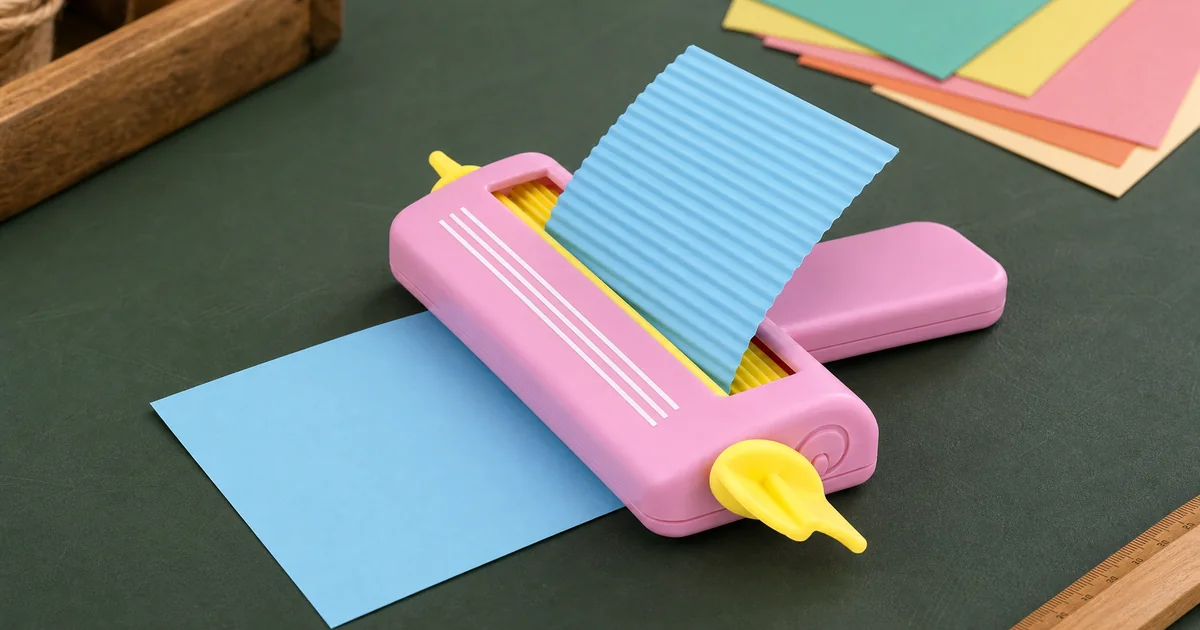
To use a manual paper crimper, place one edge of a small paper test piece squarely between the rollers and turn the side knob steadily so the sheet feeds through. The result is a repeating wavy texture that can be cut or layered for a handmade card or scrapbook page. The linked tool has a pink or blue body, yellow rollers and a hand-operated side knob. It is sold as one tool in the selected color, not a two-color set. Its published 17.5 x 13.5 x 2.5 cm measurement describes the outside of the tool; it does not tell you the maximum paper width. Test a spare piece of the material you intend to use before cutting the final design.
Put the tool on a flat, stable work surface with room for the paper to leave the opposite side. Cut a small rectangular trial piece with a reasonably straight leading edge. Guide that edge into the gap between the yellow rollers; keep your fingers clear of the moving nip and turn the side knob in the direction that draws the sheet in. If the paper does not move, stop and check its alignment rather than forcing the handle. The photographs show the paper travelling through the center of the tool and emerging with parallel waves. They do not establish a universal feed direction for every way the tool can be held, so watch the actual sheet as you turn.
Support the sheet lightly and let the rollers advance it. Pulling hard at the exit can distort the new ridges, while twisting the entering edge can make the pattern run diagonally. Work slowly enough to notice resistance. If the leading edge catches, reverse gently if the mechanism allows, remove the trial piece and start again with a clean edge. Do not feed fingers, staples, adhesive lumps or sharp embellishments through the roller gap. This is a hand-operated paper texture tool, not a cutter, laminator or heavy-duty metal embosser.
Decide where the textured strip will sit before crimping the final paper: a narrow border, a small backing panel, a tag or a decorative layer behind a photograph. Make a sample from the same stock, then measure the finished width and length on the table. Corrugation can change the way a piece lies and the space it occupies, but the listing gives no exact shrinkage percentage. Cut generously only after testing, then trim the result to the layout you actually need. A dry arrangement before gluing makes it easier to judge which direction the waves should run.
Use a restrained amount of adhesive on a trial strip and press without flattening the raised pattern. A strongly textured sheet may not sit perfectly flat across its whole back. For a card, check that the added layer still allows the fold and envelope to close. For a scrapbook page, consider the extra thickness if the album has protective sleeves. These are project-planning checks, not claims that every adhesive, sleeve or paper stock is approved for this particular crimper. Keep the finished design sized to your materials rather than assuming the machine's exterior dimensions define its usable paper area.
The public listing identifies the tool as a manual paper crimper for wavy paper crafts. It does not publish a maximum paper gsm, a minimum sheet width, a working roller width or a compatibility list for foil, coated card and thick cardstock. Do not convert the outer tool width into a feed-width specification. A sheet may be too wide to enter even when its dimension looks smaller than 17.5 cm, because the housing occupies space on both sides of the roller path. The only honest way to plan an exact project is to check the actual opening and sample the specific stock after delivery.
Begin with ordinary, uncoated craft paper offcuts that feed without resistance. If a heavier or specialty sheet matters to the project, do not assume it is supported from a generic demonstration. Ask for a confirmed material range or make a low-stakes trial, stopping if the rollers strain, the sheet tears or the waves do not form evenly. Avoid wet glue, glitter paste or other debris on the test piece; residue can affect the rollers. The photographed blue paper is an example of the resulting texture, not evidence that blue sheets are included with the tool.
First inspect the entry edge. A slanted start tends to carry through the whole strip, so recut the test piece squarely and feed it without pushing one side faster than the other. Keep turning the side knob evenly and support the sheet as it exits. If the ridges fade or the paper buckles, stop and try a smaller offcut of a different paper before touching the planned card panel. Check that there is no loose scrap or adhesive in the visible roller area. Do not dismantle the tool to fix an unknown problem or force a thick sheet through resistance.
If you need a clean rounded corner after crimping, that is a separate finishing operation with another tool; a paper crimper does not cut corners. You can compare the separate corner-rounding guide linked below for design planning, but it does not prove that both tools accept the same paper thickness. The current product page is the place to confirm color choices, photographs, price and availability. The decision table below keeps the published facts separate from the measurements and trials still needed for your own cardmaking materials.
Use this checklist to separate published product details from material compatibility that still requires a trial.
| Check | Published fact | Your next step |
|---|---|---|
| Order unit | One tool in a selected blue or pink option | Confirm the chosen color at checkout |
| Outer size | 17.5 x 13.5 x 2.5 cm | Do not treat these measurements as roller width |
| Texture | Hand-cranked yellow rollers form wavy paper | Feed a straight test piece at a steady pace |
| Paper limits | Maximum gsm and working width are not published | Check the actual opening and test the intended stock |
| Special materials | Foil, coated card and exact shrinkage are not verified | Do not promise a fit or a finished size without a sample |
Start with the current product option. The category and corner-finishing guide help with project planning but do not change this tool's unpublished paper limits.
Start with a small straight-edged test piece. Set its edge between the rollers and turn the side knob so the sheet moves through; guide it lightly without forcing it.
No. The published 17.5 x 13.5 x 2.5 cm figure is the outside size of the tool. The usable roller or paper width is not stated.
The listing does not specify a maximum paper gsm or confirm foil or thick-card compatibility. Ask for a material range or test a small offcut without forcing the rollers.
No. Choose one color option; one order is one manual crimper, not a two-tool bundle.
The listing provides no exact length-change ratio. Crimp a sample of your chosen paper and measure it before cutting the final card or scrapbook piece.
Oct 07, 2026 by SW SW
Oct 07, 2026 by SW SW
Cookie preferences