
Sep 25, 2026 / By SW-SW / in Buying Guides Tech & Gadgets
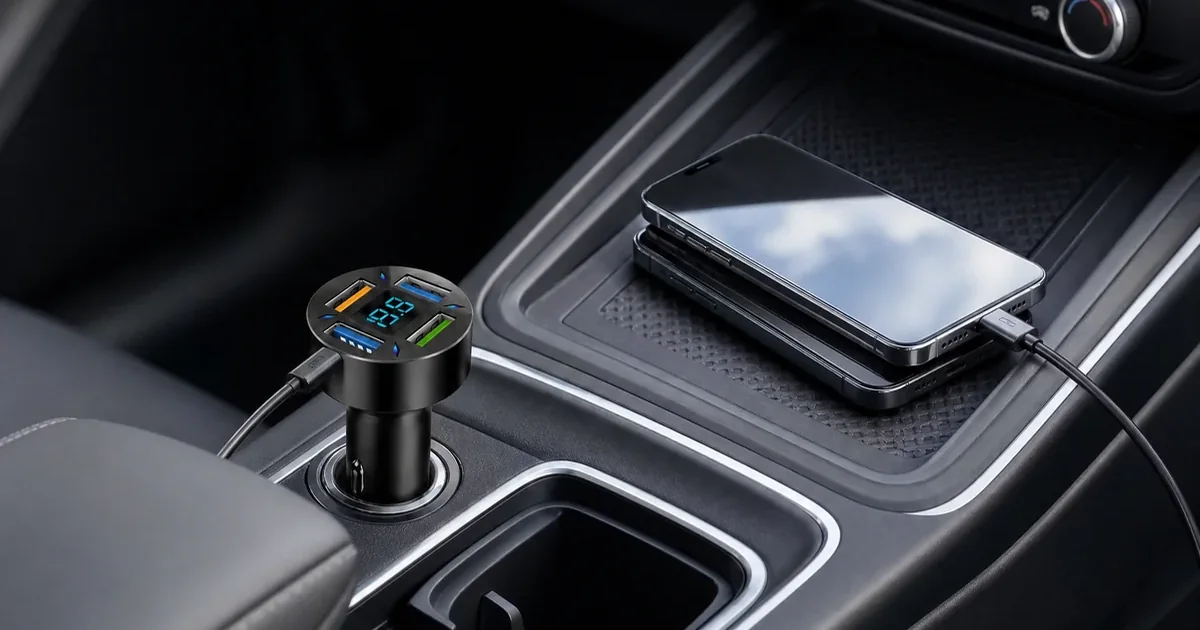
A multi-port USB car charger is useful only if your vehicle has the right 12V accessory socket and the charger head leaves enough space for every cable you plan to connect. Before buying, locate the socket, check whether a lid, shifter, cup holder or nearby controls crowd it, and confirm each device's cable connector. The charger shown here is a black adapter with multiple USB openings and a blue voltage display; the current listing says one adapter and two cables are included. That does not establish the connector type of every cable or guarantee a particular charging speed. The screen is a reference display, not a battery diagnostic test. Use it for compatible phones and small USB accessories, keep cords clear of driving controls, and check the live product page for the current package and photos. If you need a verified wattage, specific fast-charge protocol or AC outlet, this listing does not provide those claims.
Find the vehicle's accessory socket and read its label or manual before ordering. This product is described for a compatible 12V socket, not a built-in USB port or a household outlet. A socket hidden beneath a flap may accept the plug but leave too little room for the round USB head or connected cables. Compare the current product photos with the socket position in your own car, including the space between nearby cup holders, gear selector and storage lid.
Check this fit while the vehicle is parked. The head should sit securely without blocking a control or requiring the cable to bend sharply at the port. Do not use the package dimensions as exact installed clearance; they describe packaging. If the socket is unusually recessed, angled or inside a tight compartment, ask for the adapter's actual head and plug measurements before assuming it will fit.
The black adapter has multiple visible USB output openings arranged around a blue digital display. The live listing says two cables come with one charger. Inspect the current gallery for the ports and the photographed cable ends, then compare them with the connectors on your phone, tablet, earbuds or other small accessory. A supplied cable is useful only when both ends match your actual setup; different devices may still need their own cable.
Plan where each device will rest while charging. A phone should not slide into the footwell, and a cable must not cross pedals, steering, airbags or moving seat tracks. Passenger charging can be convenient, but cable routing matters more than filling every port. The product details do not verify output wattage, current per port or a fast-charge protocol, so no port color or photograph proves a particular charging speed.
The display gives a visible voltage reading on the charger head. Treat it as a simple reference that can be read when safely parked, not as a calibrated diagnostic instrument or a substitute for vehicle service. Numbers in product photographs are examples of how the display looks; they are not a fixed reading your car should show. If a vehicle warning light appears or the battery repeatedly fails to start, follow the vehicle manual or a qualified technician instead.
Visibility also depends on socket orientation. A low or covered socket may turn the display away from the driver or hide it behind cables. You should never adjust the charger or stare at the screen while driving. For many buyers, port access and cable clearance are more important than whether the display can be watched continuously.
Choose another adapter if your car lacks a compatible 12V socket, the console has insufficient space, or your device requires a documented USB-C power output or fast-charge standard. This product is positioned for phones and small USB accessories; the listing does not support a promise of laptop charging, a specific number of watts, or guaranteed simultaneous full-speed charging. Check the live SKU and packaging if those details affect your decision.
A 12V-to-AC inverter serves a different purpose: it offers a household-style outlet for a suitable low-watt charger. Do not confuse its AC output with the USB-only role of this compact adapter. If you need that comparison, read the related inverter guide. Whichever accessory you choose, avoid damaged cables, excessive heat and unattended use; unplug this adapter when it is not needed.
A compatible socket is the first gate. Then check physical clearance, connectors and power claims separately.
| Check | Known detail | Buyer action |
|---|---|---|
| Power source | Compatible 12V accessory socket | Check the vehicle label and socket position |
| Console space | Round head with multiple USB openings | Check lid, cup holder, shifter and cable clearance |
| Included items | One charger and two cables on current listing | Verify cable connectors against your devices |
| Display | Blue visible voltage reading | Use only as a parked reference |
| Charging output | No verified wattage or fast-charge protocol | Do not assume laptop or rapid-charge support |
The product page is the final source for the current package, the category shows other vehicle accessories, and the related guide explains when an AC inverter solves a different task.
No. This adapter is described for a compatible 12V vehicle accessory socket. A built-in dashboard USB port is a different connection.
The current product page says one adapter and two cables are included. Check their connector types against your devices and reconfirm the package on the live listing before ordering.
No. It is a reference reading on the adapter, not a calibrated battery or alternator diagnostic test. Read it only when parked and use proper service advice for vehicle faults.
The listing does not specify output wattage, current per port or a fast-charge protocol. Speed depends on the device, cable, selected port and vehicle power; do not assume simultaneous fast charging.
There is no verified laptop power claim or documented USB-C power-delivery rating for this listing. Check your laptop's required input and choose an accessory with a matching documented output.
Oct 16, 2026 by SW SW
Oct 16, 2026 by SW SW
Cookie preferences


